
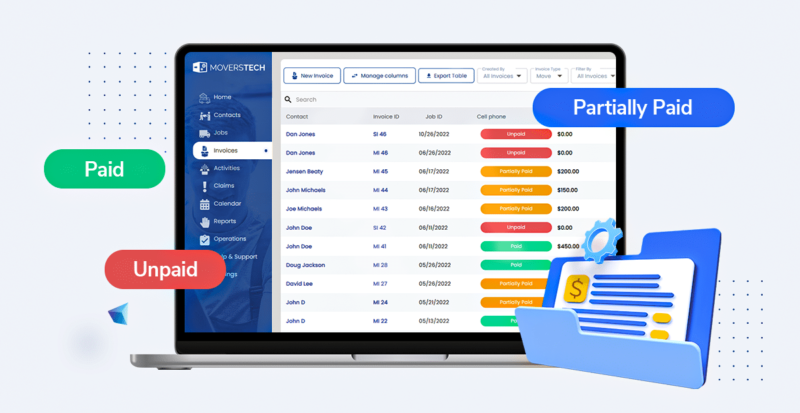
A moving company invoice should list your company and customer details, an itemized breakdown of labor, packing, transportation, and storage, plus taxes, discounts, and the total due. Below you’ll find a moving company invoice template you can download, an editable HTML example, and a field-by-field guide to billing customers clearly and getting paid faster.
A clear, professional invoice is the last touchpoint on a moving job, and often what decides how fast you get paid. Vague line items and missing details lead to disputed charges, delayed payments, and follow-up calls that eat your team’s time. This guide breaks down exactly what a moving invoice should include, shows an invoice example, and gives you a moving company invoice template you can download and reuse for every job.
| Invoice section | What to include | Example |
|---|---|---|
| Company details | Business name, address, phone, email, website, USDOT/MC number | ABC Movers · USDOT 1234567 |
| Customer details | Client name, service address, phone, email | Jane Doe · 12 Oak St |
| Invoice number & date | Unique invoice ID and issue date | INV-2043 · June 24 |
| Service description | Move type, dates, origin/destination, crew size | Local move · 2-person crew |
| Itemized charges | Labor hours, packing materials, transportation, storage, add-ons | Labor: 4 hrs × $140 |
| Subtotal, taxes, discounts | Sum of line items, sales tax/VAT, any discount applied | Subtotal $560 · tax 8% |
| Total due & payment terms | Final amount, due date, accepted payment methods | $604.80 · net 7 days |
Your guide to create professional invoices for your moving company
Before we dive into the nitty-gritty of the invoicing process, let’s take a moment to explore why professional invoices are crucial in the moving industry and how they’ve evolved with technology.
- Reflection of Professionalism: Just as a well-crafted resume speaks volumes about a job candidate, a professionally designed invoice communicates the credibility and competency of your moving company.
- The Shift from Manual to Digital: Not too long ago, creating invoices was a manual, time-consuming task prone to errors. With technological advancements, we’ve moved away from paper-based to digital ones. This shift has made the process efficient, more accurate, and less prone to human error.
- Enhancing Customer Experience: Professional invoices are more than just billing documents. They are a touchpoint with your customers that can improve their overall experience with your company. You promote transparency by providing a detailed, understandable breakdown of services and costs, which is essential to building trust with your customers.
Now that we’ve underscored the importance of crafting a proficient invoice, let’s move on to the steps you can follow to create professional invoices for your moving company. From setting up your moving CRM to detailing the essential elements, we’ll walk you through the journey that will ultimately help you improve your moving company billing and invoicing.
#1 Preparing for invoicing
The cornerstone of an efficient invoicing process lies in setting up a robust moving CRM system. A CRM centralizes customer and job information, minimizing the chances of error and reducing the time and effort you spend on administrative tasks. As a result, you can use moving CRM to create inventory lists and generate professional invoices without the hassle of manual data entry.
Accurate data synchronization is one of the standout benefits of using a moving CRM. With all your customer and job details at your fingertips, you can be sure that the information on your invoices matches your records. Moreover, the automation features provided by CRM can reduce common human errors and help you further improve your billing and invoicing.
Gather necessary information
The next step to creating professional invoices for your moving company is to gather all the essential information required to draft your invoices. The data you need include your company details, customer information, and specific service details. Keeping your information accurate and up-to-date is crucial, as errors can cause delays, miscommunications, and disputes that can harm your business’s reputation.
#2 Essential elements to create professional invoices for your moving company
Crafting an impeccable invoice is an art that combines simplicity, precision, and professionalism. As an integral part of your business communication, it’s crucial to understand the key elements that make up a comprehensive and professional invoice. Let’s dissect the anatomy of a successful invoice and unravel these essential components that can elevate your moving company’s billing process.
Company information
Begin by specifying your moving company’s name, address, phone number, email, and website. This information allows customers to identify your business and provides them various channels to contact you.
Customer information
Next, provide your customer’s name, address, phone number, and email. Ensuring the accuracy of this data is critical as it is used not only for billing but also for communication with the client.
Invoice details
An invoice should have a unique number and date. These details help you and your customers track and organize invoices, significantly simplifying the record-keeping process.
Service description and job details
Be sure to include a clear and concise description of your services. Details like the type of move, dates, and any specific tasks are necessary. Also, remember to highlight additional services such as packing or storage and their associated charges.
Itemized charges
Break down your charges into specific line items, including labor, packing materials, transportation, storage, and any additional services. An itemized list ensures transparency and helps your customers understand how costs were calculated.
Subtotal, taxes, and discounts
The subtotal is the sum of all itemized charges. Following the subtotal, include applicable taxes, such as sales tax or VAT, in line with your state and local tax obligations. If any discounts were applied, make sure to note them.
Total amount due and payment terms
Lastly, clearly state the total amount due, including taxes and discounts. Define your payment terms, specifying the due date and accepted payment methods. Offering clear instructions on how to make payments can make the process easier for your customers.
#3 Streamlining the invoicing process by moving CRM
Now that we understand the elements, let’s delve into the advantages of using a moving company CRM for invoice generation and management. With automation features, CRM software can streamline the invoicing process. Also, CRM can reduce errors in your moving business and thus save you valuable time.
A significant benefit of a CRM system is its ability to integrate with your existing financial systems, giving you an all-in-one solution for billing and invoicing. This integration ensures seamless data synchronization, simplifying financial reporting and ensuring your financial records are always accurate and up-to-date.
Download a moving company invoice template
You don’t have to build every invoice from scratch. Use the moving company invoice template below as a starting point, then adjust it to match your services and pricing.
We’ve included two formats:
- A downloadable template (PDF and spreadsheet) you can fill in for each job.
- A HTML invoice example.
You can customize with your logo, colors, and line items, then print or save as a PDF.
Each version already includes the sections above — company and customer details, itemized charges, taxes, and payment terms — so nothing critical gets left off. For companies handling dozens of invoices a week, an automated billing system that pulls these fields straight from your job data removes the manual re-typing that causes most billing errors.
MoversTech Invoice Template
| [Company Name] | INVOICE | ||||||||||||||||||
|---|---|---|---|---|---|---|---|---|---|---|---|---|---|---|---|---|---|---|---|
| [Address · City, State ZIP] | Invoice #: | ||||||||||||||||||
| [Phone · Email] | Invoice Date: | ||||||||||||||||||
| [USDOT # · MC #] | Due Date: | ||||||||||||||||||
| Fill the shaded cells. Amount, Subtotal, Tax, Total, and Balance calculate automatically. | |||||||||||||||||||
| Bill To | |||||||||||||||||||
| Customer Name: | |||||||||||||||||||
| Billing Address: | |||||||||||||||||||
| Phone: | |||||||||||||||||||
| Email: | |||||||||||||||||||
| Job Details | |||||||||||||||||||
| Move Date: | |||||||||||||||||||
| Origin: | |||||||||||||||||||
| Destination: | |||||||||||||||||||
| Charges | |||||||||||||||||||
| Description | Qty | Rate | Amount | ||||||||||||||||
| Subtotal | $0.00 | ||||||||||||||||||
| Tax rate | |||||||||||||||||||
| Tax | |||||||||||||||||||
| Total Due | $0.00 | ||||||||||||||||||
| Amount Paid | |||||||||||||||||||
| Balance Due | $0.00 | ||||||||||||||||||
| Payment Terms & Notes | |||||||||||||||||||
| Payment due: [on receipt / Net 15] · Methods accepted: [card, check, ACH] · Late fee: [%] | |||||||||||||||||||
Ensuring invoicing success
A well-built invoice does more than request payment — it shows customers your moving company runs on accurate, transparent processes. Start with the moving company invoice template above, then let MoversTech’s moving CRM pull job details, itemized charges, and taxes into every invoice automatically, so your team stops re-typing data and stops chasing corrections. It brings billing, dispatch, and reporting into one system built for movers. To see it applied to your own workflow, book a demo with our team.
Frequently Asked Questions
What should a moving company invoice include?

A professional moving company invoice should list company details, customer information, service descriptions, itemized charges, taxes, discounts, and the total amount due. Clear payment terms and accepted methods help customers understand the invoice and avoid confusion.
How do I create a moving invoice for my customers?
To create a moving invoice, gather job details, include an itemized list of services, and outline all charges clearly. Many movers use digital templates or software to reduce errors and maintain consistency across all movers invoices.
Do you have an example of an invoice for moving services?
A typical invoice for moving services includes basic customer information, a breakdown of labor, packing materials, transportation charges, storage (if applicable), and taxes. A moving invoice example often shows how to calculate totals and present charges transparently.
How can I reduce mistakes in my moving company invoices?
You can reduce errors by digitizing invoice creation, keeping job details updated, and using standardized templates for all moving invoices. Automating calculations and tax fields also helps prevent inconsistencies.
Where can I get a moving company invoice template?
ou can download the moving company invoice template on this page in both a fillable format and an editable HTML example. Each template already includes company and customer details, itemized charges, taxes, and payment terms, so you can send a complete, professional invoice without building one from scratch.
Reviewed by: Ned Bjelos
